

Firmware Update
Update the LITE Handle using the TILTA_KHRONOS_OTA Android app.
- Download the ZIP file and extract it. It contains the
TILTA_KHRONOS_OTAAPK and the.binfirmware file. - Install the
TILTA_KHRONOS_OTAapp onto your phone using the APK file. - Copy the
.binfirmware file to your phone’s internal storage. - Power off the handle.
- Enter bootloader mode: press and hold
FNCand push the zoom dial to the left. While holding both, press the Power button. Once the handle powers on, release the Power button first, then releaseFNCand the dial. - Open the
TILTA_KHRONOS_OTAapp. - Tap Step 1: Scan Device. On first launch, grant the requested Bluetooth permission.
- Select Cam Handle OTA from the device list. The list will close automatically once connected and display CAM HANDLE OTA CONNECTED.
- Tap Step 2: Select File and choose the firmware file.
- Tap Step 3: Start Update.
- Wait for the update to complete. The handle will power off automatically. Turn it back on to finish the upgrade.
Note: If the update fails, restart from Step 3. You do not need to re-enter bootloader mode.
Android APK Installation Tips
If you encounter a “Blocked by Play Protect” popup during installation, please follow these steps to proceed:
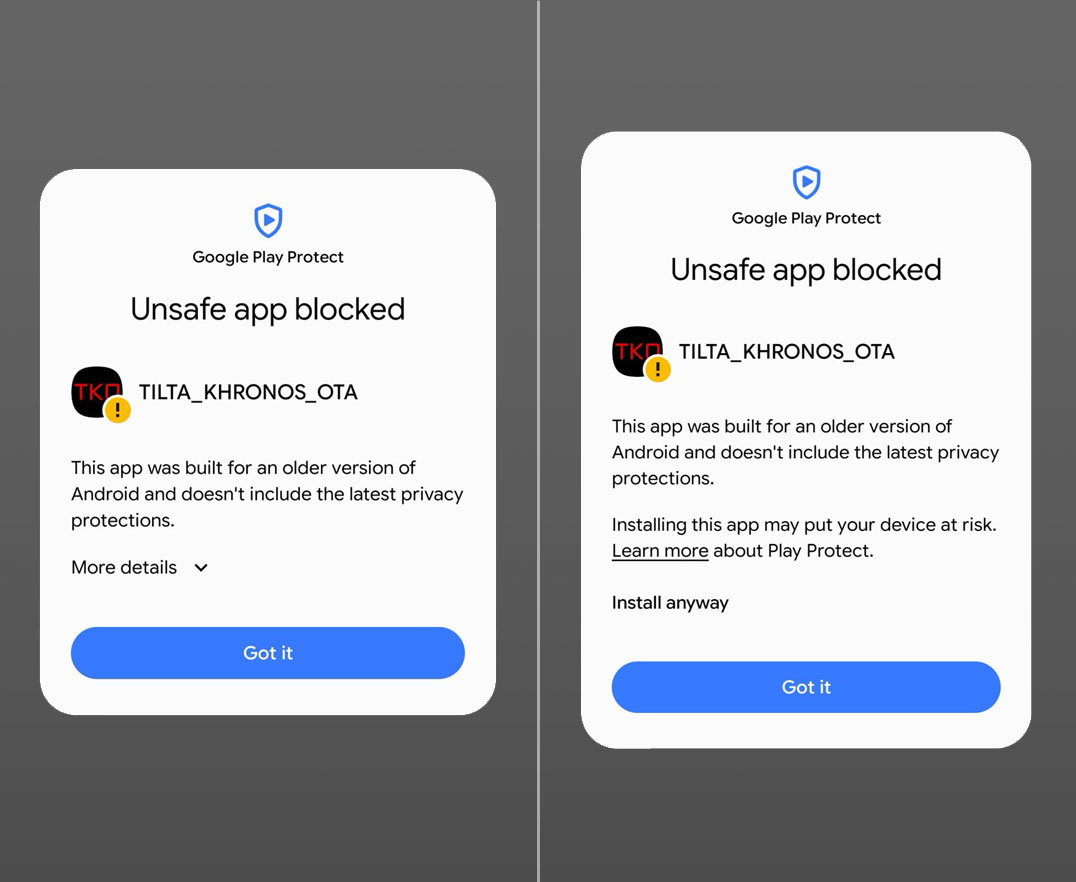
- Select “More Details”: When the warning appears, do not click “OK.” Instead, tap the “More details” dropdown or link within the popup.
- Click “Install anyway”: A new option, “Install anyway,” will appear. Tap it to continue the installation. * This app is safe and verified.
Basic Operation
- Power on: Press and hold the red Record button.
- Switch modes: Triple-press
FNCto toggle between APP Mode and HID Mode.
Controls (APP Mode)
- Front dial
- Controls focus.
- Record button
- Starts and stops camera recording.